

SLS 3D Printer Installation: What to Prepare Before Delivery
Last Updated: May 19, 2026
Reading Time: 6 Minutes
Last Updated: May 19, 2026
Reading Time: 6 Minutes
Browse products related to the article


$33,250.00


$38,160.00
What do you need to prepare for an sls 3d printer installation? At minimum, you need 9 m² of floor space, 2.4 m of ceiling height, a 0.9 m doorway, two power outlets on a dedicated line, four full air changes an hour, and an operating temperature between 16 and 25 °C. A Sinterit Lisa X or Suzy lands on site weighing about 145 kg in a flight case, so getting the room, power, ventilation, and logistics in place before delivery saves days of post-install scramble. This checklist walks through every requirement in the right order.

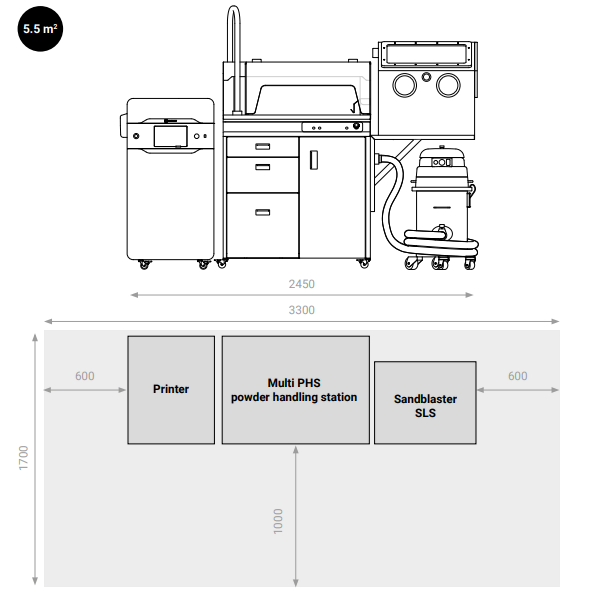
A successful install starts with a settled, level home for the machine. Plan for these dimensions:
Minimum 9 m² of floor space.
2.4 m ceiling height.
Doorways no narrower than 0.9 m wide.
At least 50 cm of clearance on every side once the printer is in position.
Flooring should be smooth, hard, level, and anti-static. Avoid carpet, and avoid rooms above large vibrating equipment like industrial presses or compressors. The print bed sintering process holds tight thermal tolerances, and stray vibration shows up as layer-line defects.
If you are placing the printer in a shared lab, plan the layout so the operator can walk around it without bumping a powder station or a parts cleaner. Ergonomics during powder handling and post-processing matter for both safety and throughput.
Sinterit Lisa X installation runs off two standard electrical outlets. Spec them as follows:
230 V single-phase (Australian standard) or 110 V with a converter.
50/60 Hz.
Protected by a B16 A fuse.
Protected by a 30 mA RCD.
Properly bonded earthing.
Use a dedicated circuit. Do not share the line with motorised equipment such as compressors, vacuum systems, or workshop machinery. Voltage dips from a starting motor cause the printer to fault mid-job, and an in-progress SLS print cannot be recovered.
If you are shipping the printer to a 110 V country, the Lisa X comes with a transformer in the crate. In Australia you plug straight into the wall.
Compressed air is required if you have ordered the Sandblaster SLS. Plan a central compressed air drop or a small standalone compressor.
Nitrogen is required if you intend to print PA11 powders. The Lisa X consumes about 0.51 m³ of nitrogen an hour during PA11 work, at 99.5 per cent purity. Decide between a bottle and a generator before delivery. Our nitrogen SLS 3D printing guide covers the trade-off.
A safe install accounts for fine powder produced during printing and post-processing. Aim for at least four full air changes per hour in the room. Run the exhaust away from staff workstations and away from the printer intake.
Avoid placing the printer under an air-conditioning vent or beside a frequently opened external door. Cold drafts disturb chamber temperature, and open doorways pull powder out of the working area.
Environmental ranges to plan for:
Storage: 5 to 40 °C.
Operating: 16 to 25 °C, with 22 °C as the sweet spot.
Humidity: 40 to 60 per cent, non-condensing.
Australian labs in coastal cities should pay attention to summer humidity. PA11 and other polyamide powders pick up moisture quickly, and wet powder sinters inconsistently. A small commercial dehumidifier is cheap insurance.
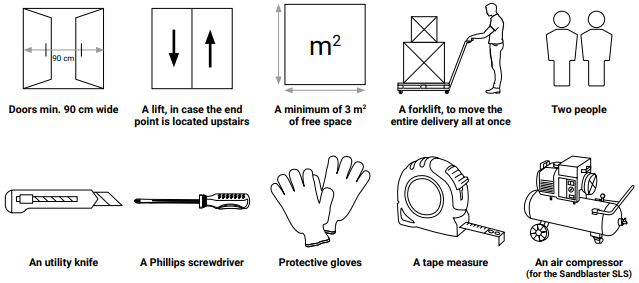
Sinterit Lisa X printers arrive in an impact-resistant flight case and weigh about 145 kg fully crated. Plan the path from the loading dock to the install room before the truck pulls up.
Logistics checklist:
Doorways at least 90 cm wide along the entire path.
3 m² of clear floor space at the unloading point.
Forklift or pallet jack on site to move the full crate in one piece.
Lift access if the install room is on an upper floor.
Two people on hand for safer handling and faster placement.
Tools to have ready before the truck arrives:
Utility knife.
Phillips screwdriver.
Protective gloves.
Tape measure.
Compressed air access if installing the Sandblaster SLS at the same time.
The Lisa X flight case includes a velcro-mounted ramp that drops down for roll-out, so you do not need a separate loading dock for the final move into the room. Open the case, drop the ramp, and roll the printer to its position.
Have one person on site who knows the order. They should photograph any visible crate damage before unpacking, check the packing list against what arrived, and photograph the unboxing in case you need warranty support later.
Which items belong on an SLS 3D printer installation checklist?
Four things sit at the top of the pre-delivery checklist: a 9 m² room with 2.4 m ceiling height and 0.9 m doorways, two dedicated 230 V power outlets, ventilation at four air changes per hour, and access to compressed air and nitrogen if you intend to run the Sandblaster or PA11 powders. Have a forklift or pallet jack on site for delivery.
How much space does a Sinterit Lisa X need?
An installation room for a Sinterit Lisa X needs at least 9 m² of floor space, 2.4 m ceiling height, 0.9 m doorways, and 50 cm clearance on every side of the printer. The printer itself measures 650 × 610 × 1200 mm and weighs 145 kg, so plan for the crate footprint plus operator working room around it.
What power supply does an SLS 3D printer need in Australia?
Power for a Sinterit Lisa X comes from two standard 230 V single-phase Australian outlets at 50 Hz on a dedicated circuit. Protect the line with a B16 A fuse and a 30 mA RCD, and avoid sharing the circuit with motorised equipment. The printer will fault mid-print on a voltage dip.
Do you need special equipment to unload a Sinterit Lisa X?
For a Sinterit Lisa X installation you do not always need a forklift, but you should plan for one. The crate weighs about 145 kg and includes a built-in ramp for roll-out. A pallet jack handles the dock-to-room move in most facilities. Lift access is required if the printer is going to an upper floor.
How much ventilation is required for SLS 3D printing?
An SLS 3D printer installation needs at least four full air changes per hour in the room. SLS printing and post-processing produces fine polymer powder, and stable air movement keeps the working area clean and the chamber temperature consistent. Avoid placing the printer under AC vents or beside frequently opened doors.
Which temperature and humidity ranges does an SLS printer need?
Operating temperature for a Sinterit SLS printer sits between 16 and 25 °C, with 22 °C the ideal target. Storage range is 5 to 40 °C. Humidity must sit between 40 and 60 per cent, non-condensing. In coastal Australian climates, a dehumidifier helps PA11 and PA-12 powders stay dry through summer.
Bringing a Sinterit Lisa X or Suzy into an Australian facility? Want a second pair of eyes on the room, power, and gas plan before the crate ships? Talk to us. We help match the printer, accessories like the Multi-Function Powder Handling Station, and the install logistics to your site. Want to view our full range of Sinterit SLS printers and accessories? Click here.
Browse products related to the article
$33,250.00
$38,160.00